Tracking spend credits
Spend credits are statement credits, in-app cash, and spend pools. Benefits gives you several capture controls depending on size and cadence. This guide covers every capture variant so you know which UI you’ll see.
Capture variants at a glance
Section titled “Capture variants at a glance”| Variant | When you see it | What you do |
|---|---|---|
| Check | Small fixed credits (under about $25 potential), memberships, discrete consumables | Tap the square to mark fully used |
| Slider | Larger pools (about $25 and up), not monthly installments | Dial a partial or full amount |
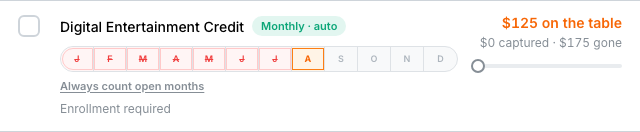
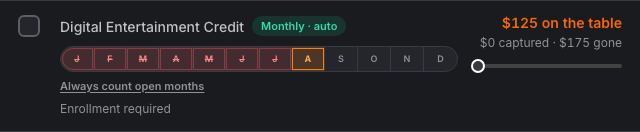
| Monthly pills | Credits that reset each calendar month | Tap a month letter; optional Always count open months |
| Quarterly pills | Q1–Q4 installments | Tap an open quarter |
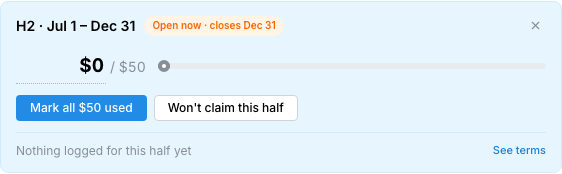
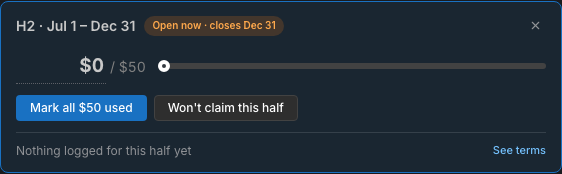
| Semiannual H1/H2 | Twice-a-year halves (Jan–Jun / Jul–Dec) | Tap H1 or H2; drawer for amounts ≥ ~$25 |
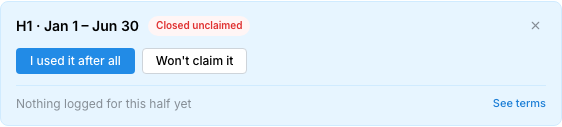
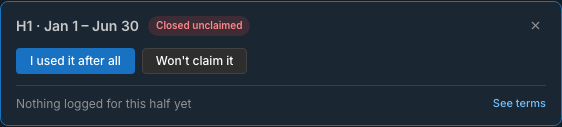
| Expired overwrite | Window closed unused | I used this / I used it after all, or Won’t claim it |
| Hide | Any non-passive credit you don’t want tracked | Eye control → confirm → Hidden |
Check-off (binary)
Section titled “Check-off (binary)”For one-time and small annual credits (Global Entry, CLEAR-style memberships, and similar):
- Open Benefits → find the card under Needs you
- Tap the empty square to mark the full amount used
- Tap again if you need to clear it


Spend pool slider
Section titled “Spend pool slider”Larger annual or one-time pools use a slider (and amount field) so you can log partial capture. Examples: Venture X $300 travel credit, Annual Bilt Cash $200, CSR Edit hotel credit.


- Move the slider (or type dollars) to what actually posted
- When the captured amount reaches the pool, the row counts as fully used
- Monthly credits never use this full-year slider — they use period pills instead
Period series
Section titled “Period series”Installment credits collapse into a period series with pills:
| Series | Pills | Examples |
|---|---|---|
| Monthly | J–D (12 months) | Amex Gold Uber Cash; Plat entertainment |
| Quarterly | Q1–Q4 | Plat Resy; some airline credits |
| Semiannual | H1 / H2 | Bilt Travel Hotel Credit; Plat hotel $300×2 |


- Open pill — tap to mark used (small amounts) or open a drawer with amount/slider
- Upcoming — future half/quarter not chaseable yet (also listed under Upcoming on the card)
- Closed unclaimed — expired half; overwrite or won’t-claim from the drawer
Semiannual (H1 / H2) deep dive
Section titled “Semiannual (H1 / H2) deep dive”Twice-a-year credits are the usual shape for Bilt Travel Hotel Credit ($50+$50 on Obsidian, $200+$200 on Palladium) and several Amex/Chase hotel or dining splits.
- H1 = Jan 1 – Jun 30 · H2 = Jul 1 – Dec 31
- Each half has its own captured amount toward the card’s net-of-fee
- Canonical walkthrough: Bilt credits and capturing
Always count open months
Section titled “Always count open months”On monthly series only, choose Always count open months if you redeem every open month (Uber Cash, entertainment, and similar). Flyga treats open months as captured without tapping each pill. Use Stop always counting when that stops being true.
Monthly · spend (qualifying purchase)
Section titled “Monthly · spend (qualifying purchase)”Some monthly credits show cadence Monthly · spend — you need a qualifying partner purchase each period (certain Lyft / DoorDash promos). Track them the same way as other monthly pills once the promo posts. (Bilt cards do not use this cadence today.)
Expired overwrite and undo
Section titled “Expired overwrite and undo”- Partial capture — leave the remainder unused until the window closes
- Expired — closed unused windows stay visible; choose I used this / I used it after all (marks overwritten) or Won’t claim it
- Undo — after mark used, hide, or write-off, an in-place strip offers Undo for a few seconds
Next: lounges and passives, or the full Bilt credits tour.